The first thing that I noticed was the title of the audio book, which mentioned that it is ‘Illustrated’. I had my doubts, how an audio book could be illustrated, may be it was named not to clash with the book by Francesco Cirillo. The narration is lucid and it was easy for me grasp most of content while driving to office, so the illustration here was more to help paint the picture in the listener’s mind. After the drive to office when I sat down to review what I heard during the drive, that is the time I felt the disadvantage of the audio book format. Fortunately ‘The Pragmatic Bookshelf’ had made the table of contents available which helped to review the chapters after I had heard them. I would say the audio book is a complement to the Paper/e-book than a standalone audio book.

Coming to the technique discussed in the book, I was surprised the speed at which I found the technique to be effective. The simplest change I did to myself was to handle the interruptions and backlogs well. As a consultant I was used to constant interruptions and as a result grow a huge backlog of tasks. I set aside just two pomodori every day for some tasks (like blogs, presentations) which required some concentration, I was able to accomplish those tasks in far lesser amount of time than I used to take earlier. The effectiveness of that prompted me to get a diary to help plan and record my days. I have begun to find the difference it brings by keeping me focused and organised on my tasks and also made me come to a mindset to drop or delegate tasks I am not able to do.

Will I recommend this audio book to anyone? I had a glance at the paper book in the library, compared to that I would say the audio book as a standalone makes it difficult to go back and refer or review what you have listened. The technique is very useful to learn and it makes a good impact in a short amount time, my suggestion is to go for the e-book/paper book, and proceed one chapter at a time, try to implement, review and introduce your variations. You will be surprised to see how quick it starts changing your lifestyle.

Two major categories of safety nets in agile application development.

  • Process side
  • Engineering side

Process Side

The process side safety nets ensure that sufficient communication between the stakeholders happen on time and strive to get together all the stakeholders on to the same page. The emphasis is not letting information lost in translation when moving from one stakeholder to the other. Some of the process level safety nets used in agile development are

Acceptance Criteria Definition

Defining acceptance criteria for stories help to define the scope of a requirement in crisp steps. The acceptance criteria will be used as a basis for automated unit/integration/functional test cases during development.

Story Review

Story review is done with analysts or developers once it is written and added to the backlog for the sprint. This will provide additional perspective to the requirements and help identify gaps in the requirement. Since the size of a story is typically small, it will be easy to distribute the stories to multiple people for review.

Story Kickoff

Every developer when starting to work on a story will be debriefed by an analyst on the scope and boundaries of the story. This ensures that the ambiguities related to the story are cleared and in case any thing new identified could be handled immediately.

Dev Box Verification

When every story is considered to be complete, the developer gets the application developed verified by the analyst if it is according to the story and it matches the acceptance criteria.

Showcase/Demo

At the end of every iteration all the stakeholders come together to view the demo of the application developed so far. This provides a common forum for all the stakeholders to agree or disagree on what they see. This ensures that the conflict of interests are resolved immediately and also provides a view of progress in terms of how the application is coming up. It provides the right forum to feed data to make course corrections.

Retrospective

A time set aside every iteration for the team to retrospect on what happened and take necessary actions to mitigate risks and resolve issues. This helps to iron out inefficiencies in the team and also a break from regular work to concentrate on improving effectiveness of the team overall.

Engineering side

The engineering side safety net ensure program verification. The correctness of the application being developed is ensured through multiple levels of automated test cases derived from the requirements. The greater the level of the test coverage the greater is the confidence on the application being developed.

Code Quality

Having strict adherence to code quality standards helps to keep the code readable, which in turn helps to onboard a new person with ease. Following effective code development practices will tend to make the code as a document for itself eliminating the need for documentation. Code quality also could be improved by pair programming and peer reviews where the review comments are incorporated then and there instead of a formal log, track and fix cycle.

Unit Tests

Having unit tests as part of the development is mandatory as it deals with the smallest unit of code. Unit tests ensure that the software is developed as per specification and since it is automated and multiple times faster than manual testing, it is one of the most effective safety nets one can have during application development. Test driving the unit test also forces good design in the code and helps to refactor with high confidence. Since the coverage area of unit tests will be so high, making last minute changes to the code will be a breezy change.

Integration Tests

Integration tests complement the unit tests, it helps to catch integration issues as early as in the coding phase. These tests will be used along with the unit tests and together will cover large areas of the developed code making changes to the code any time a welcoming one.

Automated Functional Tests

Automating the functional UI tests provides ample time for testers to concentrate on exploring the least touched areas of the application than repeating the same use cases for verifying the sanity of the application.

Exploratory Testing

This has no solid test case or plan written upfront and is the last line of defence in the safety nets, it is completely based on keeping the end user in mind and use intuition and heuristics to try to break the system. Once an issue has been found during exploratory testing, a safety net has to be in place for the bug in the of unit, integration or automated functional test

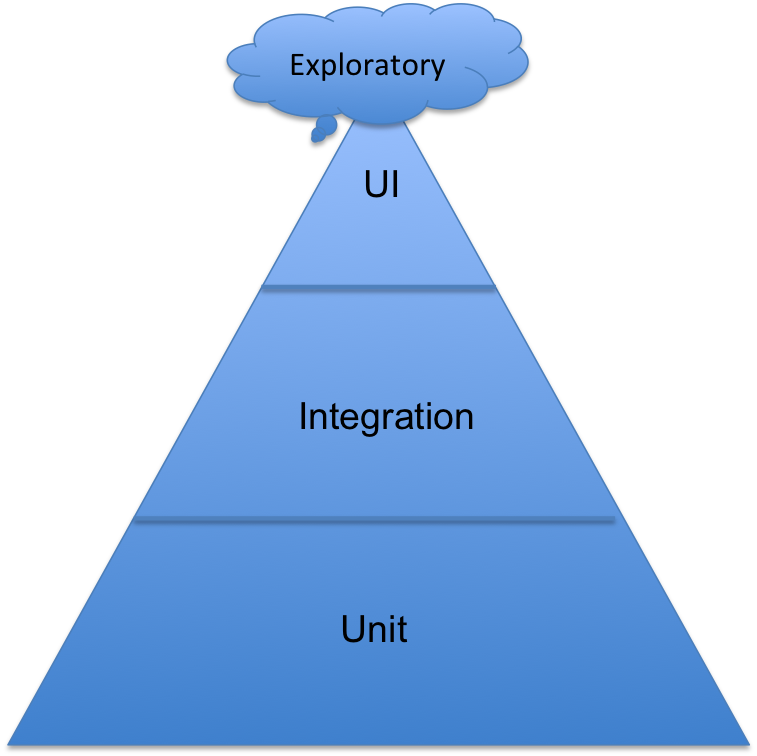
Ratio of Unit, Integration, UI and Exploratory testing

Mike Cohn mentioned about test pyramid in his book “Succeeding with Agile”. It gives the ratio between the different tests in the form of a pyramid.

MikeCohnTestPyramid

The safety nets are not self sufficient by themselves and will not be able to catch issues if we concentrate a lot on one area of the safety net as the law of averages comes into effect (The effort increases exponentially but the result increases linearly). Also not all engineering test scenarios need to be automated, the permutations of different scenarios will far exceed the sane number of automated tests written for them in a given amount of time; so a careful selection of scenarios is necessary for automation. This will help in spending the optimum amount of effort for each layer of automation.

Continuous Integration

Continuous integration is an integral part in keeping the safety nets functional. Every time a developer commits code the continuous integration server picks up the changes compiles, integrates, runs all the tests and provides the output in a report. This can act as show stopper if the safety net is broken.  The immediate feedback provided encourages developers to commit code frequently and keep it integrated always.

Having all the above safety net ensures that anything crosses the baseline of development is of very high quality and conforms to all the requirements. The lifestyle of development changes from reactive to proactive as there will be enough room left for identifying the improvement areas and fixing them while the repetitive engineering tasks are automated. This also reduces the business/user acceptance phase to be a complete demo of the product instead of one more testing round.

Sometime back read an article about how proximity to goals motivates individuals to move faster towards the goals. It is very important for people to know their progress to understand the proximity to the goal. I found that it worked on me when I was driving back to town and finished the last 30 kms significantly faster than the average speed during the rest of the journey though the travel conditions were almost similar. I also observed this behaviour with my niece & nephews in kindergarden; I used to carry them from school to home but the moment they see the house, they jump off and run inside.

How do we relate to this at our workplace? No, I am not talking about the carrot and stick approach. It is like having feature completeness charts, burn down charts and other visual indicators at work that helps visualize progress. Brain tends to reward itself with dopamine which gives a sense of accomplishment. Completing a small task does not give much of a sense of accomplishment, but pursuing a tough task may be daunting.

coffee

If people are helped with progress indicators then the task becomes easy. It is the most commonly used part in the loyalty points, people are found to be rushing their last two coffee purchases for a free coffee than the speed in which they consumed their first few. It has also been observed that people will slow down once the milestone has been achieved, they would not be buying their 11th coffee at the same speed they got their earlier onces before their reward. That is because we want to be in a state of Anxiety Neutrality (otherwise known as Comfort Zone) that we would  not kick start something. An illusion of progress or things already started may get people started.

TwoCoffeesMore

In the above illustration both coupons have the same target of 10 coffees but people are likely to get started on the second one faster as already two of them are struck out. This illusion of getting started is used by many organisations which run loyalty programs by giving joining bonus. At workplace I have observed that people at work in long duration projects initially start out slow for few weeks~months and then increasingly put hours to get the project out. Once the project is over then the resetting to a slow pace happens.

I figured out that this kind of behaviour is less common in an iterative approach and there is always a healthy sustained pace. If we plan entire work in small chunks then visualisation of progress get much easier, which gives a sense of progress and creates multiple short term and long term goals. Goal gradient effect plays an important role in iterative development.